Introducing the Gazebo Headache
Basically, Gazebo has really bad documentation and the community documentation is worse. We use Gazebo Harmonic, not Gazebo Classic and almost every guide you find on the internet will be for Gazebo Classic. Furthermore, Gazebo (version Harmonic) has a lot of documentation for migrations but not a whole lot for writing from scratch. The versioning is very confusing because people say Gazebo to refer to modern Gazebo and also say Gazebo to refer to Gazebo Classic.
Additionally, Gazebo is weirdly determined to separate itself from ROS2, but the main reason to use the program is because it has good ROS2 integration. Because of this, they have very little documentation on integrating with ROS2. This headache is compounded by the fact that most of Gazebo’s docs are written for SDF, which is just their slightly different version of URDF, so all of it needs to be translated to URDF. What they want you to do is write everything in SDF with a little ROS2 integration, but we mostly care about ROS2 features, so we want to write everything in URDF with a little Gazebo integration and that is upsetting for Gazebo.
What’s worse is the usual go-to method of just look at Nav2’s documentation isn’t going to work, because Nav2 only has Gazebo Classic documentation. This is basically going to be one of your only sources for reliable information. I highly don’t recommend asking generative AI for help as because it is only trained on the resources available on the web, it also doesn’t know anything about Gazebo Harmonic.
It is even difficult to figure out what GitHub repositories you can even look at for this specific version of Gazebo because everything’s split between 10 different repositories with different versioning schemes. You can view the full feature list at https://gazebosim.org/docs/harmonic/release-features/#harmonic.
Introducing the SDF Headache
SDF is the specific XML version that Gazebo uses. It is basically their version of URDF but very mildly different. The existence of SDF makes it a very large headache to get Gazebo working in a ROS2 URDF context. Basically, for everything you have to declare an SDF wrapper by making a gazebo reference (seen in the next sections example).
SDF also introduces several layers of versioning confusing. If you looked at the above release features link, you will see that the version of SDF that Gazebo Harmonic uses is 14.x, which will also be the version installed if you check. However, if you visit the SDF Format Specifications website, their versions only go up to 1.12. This is because of differences between the library version and the specification version. What does that mean? Who knows! All you need to know is that version 14.x package = version 1.11 on the specification website.
Basically all the information you could need about what can go into the SDF wrappers is available at the SDF Format Specifications website. You can find specific information at the SDF link Specifications, SDF Sensor Specifications, and more you can find through the first link.
Additionally, almost all examples are using depreciated SDF formats. For example, if you’ve ever seen someone declare friction in a gazebo reference link with mu1 and mu2, that is severely depreciated, but the SDF formatter is backwards compatible. In the interest of long term stability, these tutorials will ALL use modern SDF 1.11/14.x formats that will probably look extremely unfamiliar but are equivalent to a lot of older tutorials.
Gazebo Link References
This is the easy part. Let’s look at the example given in the URDF with Xacro page. Because Gazebo is determined to use SDF in everything, it will convert any Gazebo related URDF to this. You basically have to write your URDF with SDF in mind, which also makes finding documentation for this part really annoying. Imagine you are writing an SDF wrapper.
<?xml version="1.0" encoding="utf-8"?>
<robot xmlns:xacro="http://www.ros.org/wiki/xacro">

    <!-- Add Gazebo references to links including color and friction values -->
    <gazebo reference="linkname">
        <!-- SDF stuff goes in here, this is a wrapper -->
    </gazebo>

    <!-- Define Gazebo info for any sensors -->
    <gazebo reference="sensorname">
        <!-- SDF stuff goes in here, this is a wrapper -->
    </gazebo>

</robot>
The first part, adding Gazebo references, is really easy. There is basically only two things you can do there, give a specific link a color and various physics properties. The full amount of things that can go into this SDF wrapper can be found at SDF link Specifications, keep in mind that Gazebo Harmonic uses SDF version 14.x which = SDF specification version 1.11 (see Introducing the SDF Headache).
You do not need to use most of the tags available to you in a reference link. A common example of a Gazebo reference link is given below:
<!-- Old and bad depreciated version -->
<gazebo reference="wheel">
    <material>Gazebo/Blue</material>
    <mu1 value="0.0"/>
    <mu2 value="0.0"/>
</gazebo>

<!-- New SDF version that you should use even though it's more annoying -->
<gazebo reference="wheel">
    <visual>
        <material>
            <ambient>0 0 1 1</ambient>
            <diffuse>0 0 1 1</diffuse>
            <specular>0.1 0.1 0.1 1</specular>
        </material>
    </visual>

    <collision>
        <surface>
            <friction>
                <ode>
                    <mu>0.0</mu>
                    <mu2>0.0</mu2>
                </ode>
            </friction>
            <contact>
                <ode>
                    <kp>10000000.0</kp>
                    <kd>1.0</kd>
                </ode>
            </contact>
        </surface>
    </collision>
</gazebo>
Important notes, both of those are equivalent and you can find documentation for all these sections in the matching section for the tags. For example, what is allowed to go in the collision tag is found in the collision page of the SDF Format Specifications. If you are confused about what any of these mean, it is recommended to go look there.
You will rarely need to add more to a gazebo link reference besides color and friction values. The original URDF should have things like inertia and proper collision.
Gazebo Sensors
This is arguably the most important part. In order for autonomy to actually work in Gazebo, you have to properly declare the sensors. First of all, this page assumes you have already made a URDF sensor joint/link pair in sensors.xacro and just need the Gazebo information added. This means that the shape and physical properties of the camera are assumed to already be implemented elsewhere and only Gazebo specific information needs to be added.
Remember, the Gazebo reference sensor is just a wrapper for SDF, so all available tags for these sensors can be found at the SDF Sensor Specifications (specification version 1.11, SDF package version 14.x).
There are well over 40 different types of sensors available, which you can see at the Sensor Type Attribute description, so we will just focus on the two most used ones: LiDARs and cameras.
The recommended tag to use for a LiDAR is “gpu_lidar” (there is just a plain “lidar” option that will run on the CPU but why would you want that) and cameras have several different cameras you can choose. The basic “camera” tag is just for RGB images, the “depth_camera” tag is for cameras that ONLY produce depth information, and “rgbd_camera” is for cameras that have RGB and depth output. You will likely be using both “gpu_lidar” and “rgbd_camera”.
<!-- GPU Lidar example with some common values -->
<gazebo reference="lidar_example_link">
    <sensor name="lidar_example" type="gpu_lidar">
        <pose>0 0 0 0 0 0</pose>
        <always_on>true</always_on>
        <visualize>true</visualize>     <!-- Show in Gazebo? -->
        <update_rate>10</update_rate>
        <topic>scan</topic>             <!-- Topic where the sim LiDAR publishes data -->
        <gz_frame_id>lidar_example_link</gz_frame_id>   <!-- must match the links name in URDF -->

        <!-- These values will have to be taken from manufacturer specifications per LiDAR -->
        <lidar>
            <scan>
                <horizontal>
                    <samples>360</samples>
                    <resolution>1</resolution>
                    <min_angle>${-pi}</min_angle>
                    <max_angle>${pi}</max_angle>
                </horizontal>
                <vertical>
                    <samples>16</samples>
                    <resolution>1</resolution>
                    <min_angle>-0.261799</min_angle> <max_angle>0.261799</max_angle>
                </vertical>
            </scan>
            <range>
                <min>0.1</min>
                <max>30.0</max>
                <resolution>0.01</resolution>
            </range>
            <noise>
                <type>gaussian</type>
                <mean>0.0</mean>
                <stddev>0.01</stddev>
            </noise>
        </lidar>
    </sensor>
</gazebo>


<!-- Declare optical link/joint here... -->
<!-- If you don't understand, see the next section -->
<joint type="fixed" name="camera_optical_joint">
    <origin xyz="0 0 0" rpy="-1.5707 0 -1.5707"/>
    <child link="camera_optical_link"/>
    <parent link="camera_link"/>
</joint>

<link name="camera_optical_link"/>

<!-- RGB and Depth camera example with some common values -->
<gazebo reference="camera_optical_link">
    <sensor name="rgbd_camera" type="rgbd_camera">
        <pose>0 0 0 0 0 0</pose>
        <always_on>true</always_on>
        <update_rate>30</update_rate>
        <visualize>true</visualize>     <!-- Show in Gazebo? -->
        <topic>rgbd_camera</topic>      <!-- Topic where the sim camera publishes data -->
        <gz_frame_id>camera_link</gz_frame_id>  <!-- must match the links name in URDF -->

        <!-- These values will have to be taken from manufacturer specifications per camera -->
        <camera name="camera_optical_link">
            <horizontal_fov>${69.4 * pi / 180}</horizontal_fov>
            <image>
                <width>640</width>
                <height>480</height>
                <format>R8G8B8</format>
            </image>
            <clip>
                <near>0.01</near>
                <far>300</far>
            </clip>

            <depth_camera>
                <clip>
                    <near>0.1</near>
                    <far>10.0</far>
                </clip>
            </depth_camera>

            <noise>
                <type>gaussian</type>
                <mean>0.0</mean>
                <stddev>0.007</stddev>
            </noise>
        </camera>
    </sensor>
</gazebo>
These are not the only values that a camera or LiDAR can have, and you can view the rest at the SDF Sensor Specifications. A full guid on RGBD cameras for Gazebo Harmonic can be found in the MOGI ROS Week 5/6 Repo.
However, there is a major issue with cameras that need to be solved in Gazebo. Please see the following section on optical links.
Gazebo Optical Links/Joints
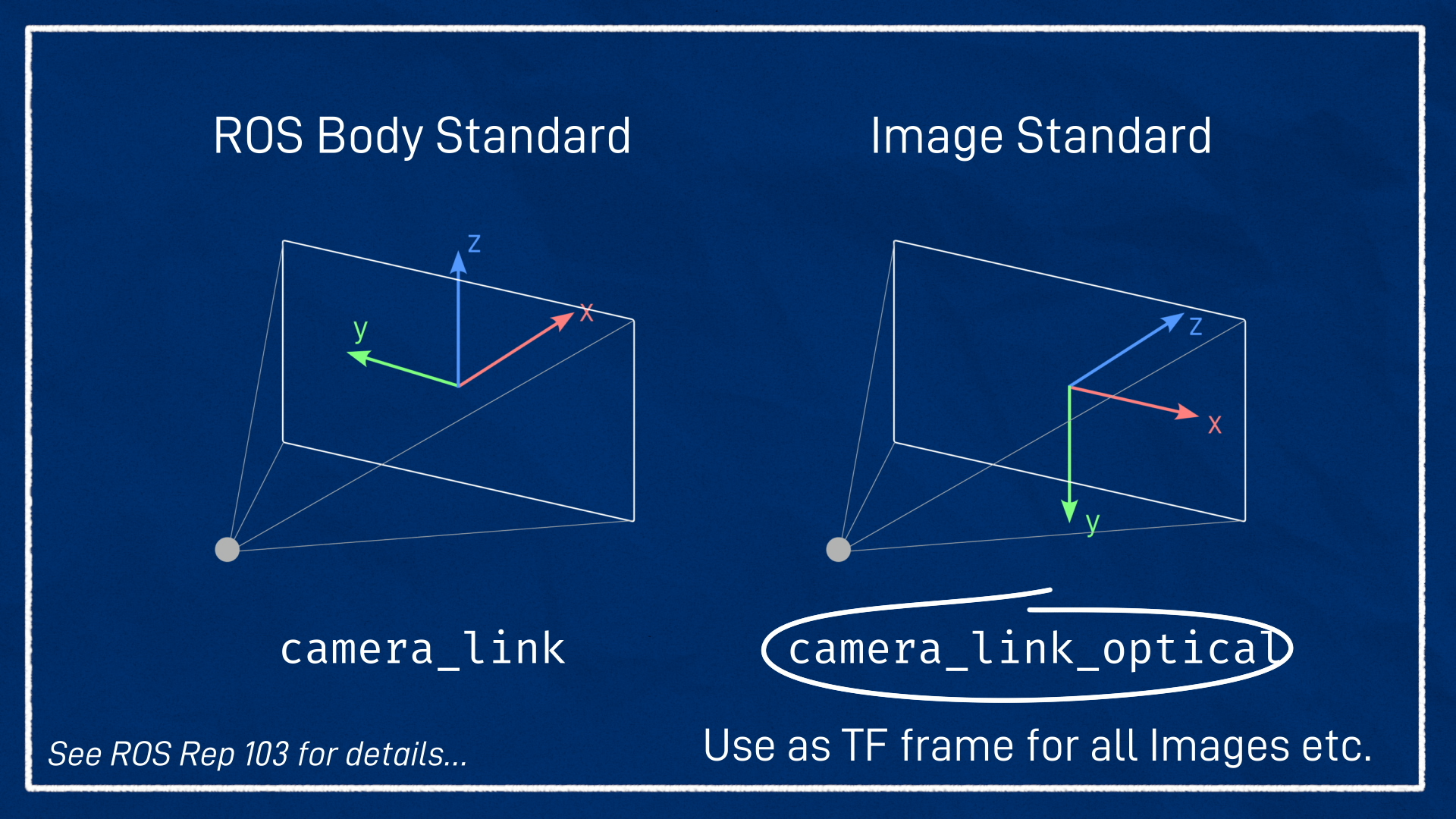
You may be wondering, what and why is an optical link. This is yet another mismatch between Gazebo and ROS, but this one is more of a conflicting standards issue. The official ROS standards use a right-hand coordinate system, meaning X forward, Y left, and Z up. Vision systems (not just Gazebo) follow a different standard of Z forward, X to the right, and Y down.
The optical link is just a child of the regular camera link and all it does is rotate the URDF version a little bit so it’s aligned with what Gazebo expects. That is it. Keep it in mind when using cameras and Gazebo.
Author: Ella Moody (https://github.com/TheThingKnownAsKit)